What practices, processes or shortcuts have you developed in FBS to:
1. Increase effectiveness?
2. Improve effeciency?
3. Enhance internal control?
4. Better comply with statutes and policies?
Friday, May 27, 2011

Wednesday, March 30, 2011
Optimizing Hardware for .NET Performance
All things being equal, .NET (Version 10.0) will run slower than Visual Basic (Version 8.11). We published the minimum requirements in February's newsletter; however, I think what most people want to know is the hardware configuration that will at least equal, if not exceed the speed of reports in 8.11. A rule of thumb is that a 10.0 "long" report will take 60% longer on the same computer. Keep in mind there are a lot of other critical variables like network routers, cables, servers and drive RPMs and access speeds.
Here are CPU ratings. Find your current CPUs (Computer/Properties), then compare the ratings of the high end CPUs. Just because a rating of one CPU is 2X that of another does not mean it will run a report 2X faster. In the benchmark below the first computer should have performed 1.846 X the second based on the ratings. In actuality it was around 1.25 X.
http://www.cpubenchmark.net/high_end_cpus.html http://www.cpubenchmark.net/mid_range_cpus.html http://www.cpubenchmark.net/midlow_range_cpus.html http://www.cpubenchmark.net/low_end_cpus.html
Benchmark: Trial Balance, Date Cash Exchanged, 60 month look-back, prior year display on, 38,000 records/year
AMD Athlon II X4 630 Processor, @ 2.8 Ghz, 6GB 64-Bit (3.250 rating)
- 8.11 3:34 (214 seconds) (1.266 x Lenovo)
- 10.0 5:48 (348 seconds) (1.25 x Lenovo) (162% speed of 8.11)
Lenovo Intel Core2 Duo, T400 @2.53 Ghz, 2GB, 32-Bit (1.76 rating)
- 8.11 4:31, (271 seconds)
- 10.0 7:15, (435 seconds) (160% speed of 8.11)
Tablet Computers
For those of you who are experiementing with tablets:
Tuesday, February 22, 2011
What Do You Want to Do Next?
Most of our new product ideas and enhancements come from our most vocal users, who communicate directly with the FBS development team. Why not post your suggestions here and see if anyone thinks like you do?
Thursday, January 20, 2011
Timing is Everything
Have you experienced any of the accounting issues described in the "Timing is Everything" story in the January FarmSmart newsletter?
Monday, December 20, 2010
The (Accounting) Golden Rule
What do you think about this approach to synchronizing accounting and production data? Does it make a difference if dollar values don't tie out? How much work and effort would you save if everything was all in one spot?
Thursday, December 2, 2010
Wednesday, December 1, 2010
(How) Do You Manage Margins?
The traditional marketing objective in agriculture is to maximize prices received. However, Moe Russell of Russell Consulting Group recommends the "crush margin" approach, locking in a target margin per head or acre by computing the spread between costs and revenues rather than focusing only on product market prices. Commodity and Ingredient Hedging (CIH) follows a similar strategy and compares potential margins against historical margin percentiles.
FBS software is designed to 1) accurately compute your own historical margins, 2) project production input requirements, and 3) account for the complex marketing transactions and match them to the appropriate time period and product.
Are any of you doing this, and if so, how? Are you interested in learning more?
Here's a recent article citing Dr. Steve Meyer's emphasizing feed's role in margins this winter.
FBS software is designed to 1) accurately compute your own historical margins, 2) project production input requirements, and 3) account for the complex marketing transactions and match them to the appropriate time period and product.
Are any of you doing this, and if so, how? Are you interested in learning more?
Here's a recent article citing Dr. Steve Meyer's emphasizing feed's role in margins this winter.
Tuesday, November 30, 2010
World's Craziest Motorcycle Commute
Ride along with Andy Brown as he circumvents traffic on the streets of Nairobi, Kenya, during a typical ride home from work. Definitely not for the faint of heart.
http://brownsinafrica.com/
http://brownsinafrica.com/
Thursday, October 28, 2010
When You Can't Count on Your Accounting Program
Last month we compared the accounting power gleaned from management segments (usually called “cost/profit centers”) versus the “big bucket” accounting approach still used by many producers. This month we’ll switch to another, equally-important dimension: units of measure.
Accounting that counts dollars but not quantities can’t tell you much about your operation. Here’s why:
• Most everything in farming is purchased, sold, used and valued in standardized units of measure (bushels, gallons, tons, etc.)
• In order for accounting entries to drive inventories, quantities must be captured.
• A “per-unit” approach allows meaningful comparisons between segments and operations of varying scales.
• Units explain the source of variance from budgets.
Units of measure in the ag world are much more complex than most other businesses.
• A single transaction can incorporate dual quantities (head-pounds, wet bushels-dry bushels, tons-bales).
• Often the units of measure change between the point of purchase and application (bags-kernels of seed or gallons-ounces of chemicals).
• In addition to these “direct units” associated with accounting transactions, agriculture relies on a wide variety of “indirect units” (acres, animal capacity, hours).
While some of these indirect measurements can be “folded in” after-the-fact, direct units must be captured within the same transaction as dollars, accounts and centers. Numerous work-arounds (recording quantities in notation fields or separate quantity accounts) have been attempted in Main Street accounting programs, but the results literally don’t add up.
Accounting that counts dollars but not quantities can’t tell you much about your operation. Here’s why:
• Most everything in farming is purchased, sold, used and valued in standardized units of measure (bushels, gallons, tons, etc.)
• In order for accounting entries to drive inventories, quantities must be captured.
• A “per-unit” approach allows meaningful comparisons between segments and operations of varying scales.
• Units explain the source of variance from budgets.
Units of measure in the ag world are much more complex than most other businesses.
• A single transaction can incorporate dual quantities (head-pounds, wet bushels-dry bushels, tons-bales).
• Often the units of measure change between the point of purchase and application (bags-kernels of seed or gallons-ounces of chemicals).
• In addition to these “direct units” associated with accounting transactions, agriculture relies on a wide variety of “indirect units” (acres, animal capacity, hours).
While some of these indirect measurements can be “folded in” after-the-fact, direct units must be captured within the same transaction as dollars, accounts and centers. Numerous work-arounds (recording quantities in notation fields or separate quantity accounts) have been attempted in Main Street accounting programs, but the results literally don’t add up.
November Webinar Schedule
Start you work week off with instant and free training delivered right to your computer screen. Our Monday morning webinars run from 10:00 am-11:00 am CST.
Smart Feeder User-Defined Reports, November 1st.
Preparing your accounting records for year end, November 8th.
Integrating FBS with DTN market data, November 15th.
Accounting for hedging transactions, November 22nd.
Advanced livestock budgeting and margin analysis, November 29th.
To register, e-mail support@fbssystems.com by 9:00 am CST on the day of the webinar.
Smart Feeder User-Defined Reports, November 1st.
Preparing your accounting records for year end, November 8th.
Integrating FBS with DTN market data, November 15th.
Accounting for hedging transactions, November 22nd.
Advanced livestock budgeting and margin analysis, November 29th.
To register, e-mail support@fbssystems.com by 9:00 am CST on the day of the webinar.
Q&A of the Month--Backing Up On a CD
Q. I’m trying to make a backup of my data onto a CD through FBS and keep getting an error 280. What am I doing wrong?
A. Error 280 indicates a faulty “disk.” If you’re trying to save to a floppy disk or a memory stick (thumb drive) this could mean that device is damaged, so try another. If you’re attempting to save data directly to a CD or DVD the issue is that FBS cannot write or save directly to an “optical drive.” You can still backup FBS data to a CD, but you’ll need to follow these steps:
1. Under Utilities Save Data, choose a destination location on your local drive (such as C:\My Documents, or even better, make a new folder called, “FBS Backup.”)
2. Through My Computer or Windows Explorer navigate to the location where you just made the backup. The file will be named with your company’s three initials and the date (for example, xxx_101110.zip).
3. Insert a writable CD or DVD in your computer.
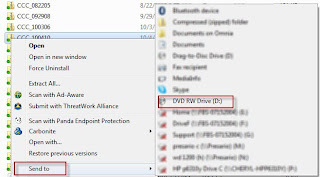
4. Right-click on the backup file and choose Send To and then select the CD/DVD drive. The built-in Microsoft writer will then copy the backup file to the optical drive.
5. To verify that the file as been copied successfully, view the CD/DVD through Windows Explorer or My Computer.
We recommend that you leave the original backup file on your hard drive. While internal backups won't protect you from a hard drive crash, they’re readily accessible in the event one or more data files are corrupted.
A. Error 280 indicates a faulty “disk.” If you’re trying to save to a floppy disk or a memory stick (thumb drive) this could mean that device is damaged, so try another. If you’re attempting to save data directly to a CD or DVD the issue is that FBS cannot write or save directly to an “optical drive.” You can still backup FBS data to a CD, but you’ll need to follow these steps:
1. Under Utilities Save Data, choose a destination location on your local drive (such as C:\My Documents, or even better, make a new folder called, “FBS Backup.”)
2. Through My Computer or Windows Explorer navigate to the location where you just made the backup. The file will be named with your company’s three initials and the date (for example, xxx_101110.zip).
3. Insert a writable CD or DVD in your computer.
4. Right-click on the backup file and choose Send To and then select the CD/DVD drive. The built-in Microsoft writer will then copy the backup file to the optical drive.
5. To verify that the file as been copied successfully, view the CD/DVD through Windows Explorer or My Computer.
We recommend that you leave the original backup file on your hard drive. While internal backups won't protect you from a hard drive crash, they’re readily accessible in the event one or more data files are corrupted.
Thursday, October 14, 2010
FBS Users in the News
Iowa farmer Ron Swanson describes his business plan as a "living document" in The Life of a Business Plan in the October 2010 edition of Farm Journal Top Producer. While most producers have never even seen a business plan, Swanson reviews his entire plan annually and some pieces--like the marketing plan--much more frequently. Read Ron's comments and advice from experts from Purdue and Texas A&M by clicking on this link:
http://www.agweb.com/topproducer/article/the_life_of_a__business_plan/
http://www.agweb.com/topproducer/article/the_life_of_a__business_plan/
Tuesday, October 5, 2010
Indiana Pork Producer Still Isn't Smiling
With U.S. livestock producers under assault from multiple branches of government, it's encouraging to hear spirited and logical defense from folks we know in the industry. Indiana pork producer, NPPC Chair of the Competitive Markets Committee and FBS User, Mark Legan has been at the forefront in opposing the USDA's new GIPSA (Grain Inspection, Packers and Stockyard Administration) sweeping new regulations that he believes will stifle competition in the name of fairness.
Legan has already testified on behalf of the NPPC at the USDA/DOJ workshop in Ft. Collins, Colorado and now adds his voice to the pages of the Indianapolis Star. Read it here: http//www.indystar.com/article/20101002/OPINION01/10020323/-1/7daysarchives/Livestock-farmers-uneasy, and post your comments on what you think of these proposed regulations.
Legan has already testified on behalf of the NPPC at the USDA/DOJ workshop in Ft. Collins, Colorado and now adds his voice to the pages of the Indianapolis Star. Read it here: http//www.indystar.com/article/20101002/OPINION01/10020323/-1/7daysarchives/Livestock-farmers-uneasy, and post your comments on what you think of these proposed regulations.
Wednesday, September 29, 2010
Are You a "Big Bucket" Accountant?
 In recent years we’ve observed two divergent trends inside many leading-edge operations:
 1) Business scale and complexity are increasing exponentially.
2) Rather than recalibrating their accounting system to match this new level of detail, managers often turn to stand-alone, production-oriented record systems as their primary, if not exclusive, management platform. For example, crop growers use mapping programs while livestock producers either subscribe to an online record service or specialized production software.
As a result, even as the production view of the business achieves greater sophistication and granularity, the accounting process is relegated to a generic, “Big Bucket.”
The potentially-fatal flaw in this strategy is that accounting is the core control process in any business.
1) Planning, action and performance monitoring must ultimately be valued in actual dollars. By necessity, stand-alone production programs use “plugged” cost and revenue assumptions.
2) If a segment can be managed it should also be evaluated as a cost or profit center within the accounting system. Big Bucket accounting can’t effectively track or roll-up costs for the number of centers in most operations nor can it allocate costs to other centers.
3) In order for an accounting system to be in control, there must be a true tie-out between the balance sheet, income statement and actual inventories. “Big bucket” accounting generally relies on “plugged” or standard work-in-process inventories disconnected from real production data.
This deficiency is not a concern for most production software developers. After all, their expertise is in the agronomic/physiological worlds, not the accounting field. However, without meaningful segmentation and tie-out between accounting and production numbers your big, generic, un-integrated accounting bucket most certainly will be leaking.
What do you think?
Tuesday, September 28, 2010
What's Just Around the Corner?
Here's an inside look at what's happening deep inside the super-secret FBS Bunker:
- Version 10 (.NET), our biggest upgrade in years, is currently consuming 90% of our R&D efforts (on quiet days, anyway). Switching to .NET will keep your software compatible with the Microsoft and web worlds for years to come, but it also takes a lot more programming time and testing than our usual upgrades. As a result, we're certain that we won't hit the normal VIP/Corporate October shipment target this year. Meanwhile...
- We will be releasing an interface with DTN market prices this Fall. You can see a preview of this exciting technology through our webinar on Monday, October 4th. (See Webinar Schedule below.)
- By this time next month we plan to "cut-over" to a brand-new Website and e-newsletter format that will knock your socks off! Stay tuned (as if you have a choice with the Internet).
October Webinar Schedule
Our Monday morning webinars are back with all-new content. All run from 10:00 am-11:00 am CDT.
Integrating FBS with DTN market data, October 4th.
Accounting for hedging transactions, October 11th.
Advanced livestock budgeting and margin analysis, October 18th.
Smart Feeder User-Defined Reports, October 25th.
To register, e-mail support@fbssystems.com by 9:00 am CDT on the day of the webinar.
Integrating FBS with DTN market data, October 4th.
Accounting for hedging transactions, October 11th.
Advanced livestock budgeting and margin analysis, October 18th.
Smart Feeder User-Defined Reports, October 25th.
To register, e-mail support@fbssystems.com by 9:00 am CDT on the day of the webinar.
Monday, September 27, 2010
Q&A of the Month--Hot Keys
Q. Are there any shortcuts to make data entry in FBS faster and easier?
A. Yes, there are over 40 “Hot Keys” built into FBS that make input and navigation faster and easier. To learn what these keys are and what they do, go to the Help menu from the FBS main screen, then click on FBS Hot Keys to display, print or export this list.
Here are a few examples for TransAction Plus data entry hot keys:
Press the F12 key after you select the vendor to scroll through all previous entries made to this vendor during this calendar year. This hot key acts much like an input macro (or “template”) in that you can save any of these prior entries as new entries (with, of course, a new date and necessary changes to amounts, accounts and centers).
Speaking of macros, the F8 key will bring up your macro or vendor list depending on what field you are in and F9 will toggle the vendor list on and off.
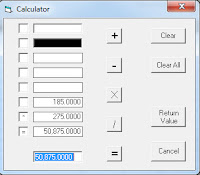 Click F4 (or “+,” “*,” or “/”) in any numeric field to bring up a calculator from which you can paste the calculated value back into TransAction Plus by pressing Enter two times (same as the Return Value button).
Keep reading this column for more handy hot keys and tips!
A. Yes, there are over 40 “Hot Keys” built into FBS that make input and navigation faster and easier. To learn what these keys are and what they do, go to the Help menu from the FBS main screen, then click on FBS Hot Keys to display, print or export this list.
Here are a few examples for TransAction Plus data entry hot keys:
Press the F12 key after you select the vendor to scroll through all previous entries made to this vendor during this calendar year. This hot key acts much like an input macro (or “template”) in that you can save any of these prior entries as new entries (with, of course, a new date and necessary changes to amounts, accounts and centers).
Speaking of macros, the F8 key will bring up your macro or vendor list depending on what field you are in and F9 will toggle the vendor list on and off.
Click F4 (or “+,” “*,” or “/”) in any numeric field to bring up a calculator from which you can paste the calculated value back into TransAction Plus by pressing Enter two times (same as the Return Value button).Keep reading this column for more handy hot keys and tips!
Friday, September 10, 2010
FBS Users in the News
Kerry Knuth, Mead, Nebraska describes how he takes advantage of basis moves and uses FBS E.CLIPSE management accounting to track transportation costs in the September 2010 Farm Futures cover story, "The Joy of Marketing." To illustrate Knuth's cost-tracking prowess, F.F. photographed him in front of is JD 9430 48-row planter. Click on this link and select the September issue: http://www.farmfutures.com//customPage.aspx?p=168
Friday, September 3, 2010
More User Conference Moments
Thanks to Paul Hey for these candid shots from the 2010 FBS User Conference.
 The User Conference began with special training for professional farm managers.
 John McNutt explains the process of hiring controller/CFO services.
 Jim Marzolf presents the LarsonAllen perspective on the function of controllers and CFOs.
 Steve McWilliams compares the pros and cons of out-sourcing CFO services.
 Bill Stangel offers his insight on farm management technology.
 Norm explains how users can take controll of their data.
 Don Konz describes some of DTN's ag professional solutions.
 The User Conference began with special training for professional farm managers.
 John McNutt explains the process of hiring controller/CFO services.
 Jim Marzolf presents the LarsonAllen perspective on the function of controllers and CFOs.
 Steve McWilliams compares the pros and cons of out-sourcing CFO services.
 Bill Stangel offers his insight on farm management technology.
 Norm explains how users can take controll of their data.
 Don Konz describes some of DTN's ag professional solutions.
Subscribe to:
Posts (Atom)